
Are you looking for an easy way to create professional-looking video clips for your school, business, church, or special event? Look no further than FlexClip, a user-friendly online tool that’s like “Canva for video.”
What is FlexClip?
FlexClip is a browser-based video creation platform that allows you to quickly produce impressive video clips using customizable templates. With FlexClip, you can:
- Choose from a wide variety of pre-made templates
- Customize text, images, and animations
- Export your finished video in multiple formats
The best part? You can create some pretty nice videos for free!
How to Use FlexClip
- Go to FlexClip.com and create an account
- Browse templates or search for a specific topic
- Select a template and choose your desired video size (16:9 for YouTube, vertical, or square)
- Customize the template by:
- Replacing text
- Inserting your own images or logos
- Adjusting animations and timing
- Export your finished video
Features and Pricing
FlexClip offers a free plan that allows you to create up to 12 projects with a FlexClip watermark. Paid plans are available for users who need more options and features.
My Experience with FlexClip
I recently tried FlexClip for the first time and was impressed with how intuitive and user-friendly it was. Without any prior instruction, I was able to:
- Replace template text with my own content
- Insert my logo
- Customize images and animations
The result was a professional-looking video clip created in just minutes.
Other More Advanced Capabilities of FlexClip
FlexClip also gives you these capabilities:
Key features of FlexClip:
- Online-based platform and easy to use with thousands of templates and free media resources.
- Built-in screen/webcam recorder. A group of video editing tools like video compressor, video converter, etc.
- Text to Video (AI)
- Text to Speech. (AI)
- AI Video Script (AI)
- AI Image Generator. (AI)
- Background Removal. (AI)
- Auto Subtitles. (AI)
- AI Noise Reducer (New AI)
- AI Vocal Remover. (New AI)
- Team collaboration.
For a more in-depth review of FlexClip, here is an excellent video.
Pricing
At present, here is the current pricing plan:

Is FlexClip Right for You?
If you’re familiar with Canva for graphic design, you’ll appreciate how FlexClip brings that same ease-of-use to video creation. It’s an excellent tool for anyone looking to create promotional videos, event announcements, or social media content without the need for complex video editing software.
Want to see FlexClip in action? Be sure to watch the video.
And we save the best part for last…
After creating the video and writing this post, I decided to put FlexClip to the test…to create a narrated video with background music simply by copying and pasting the text of this blog post.
I started by Opening FlexClip and clicking the “Create a Video” button on the left. One of the selections was “AI Video Generator.”
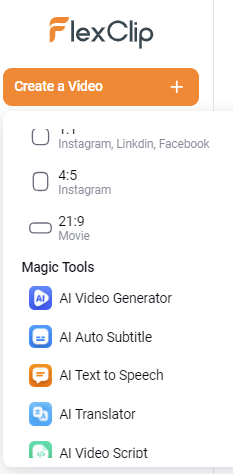
In the next screen, I could choose “AI Text to Video” or “Article/URL to Video.” I chose the first selection. A box appeared. I copied and pasted the text of this blog post. From there, I allowed FlexClip to work its magic.
Once FlexClip generated the project, I had the option to download as well as save to YouTube, Dropbox, OneDrive, or Google Drive. FlexClip also gave me the option to create a link to save on the FlexClip server.
Here is what FlexClip generated for me with no editing on my part, merely FlexClip working from the copy/paste of text from this post:
Would FlexClip be something that would make your life easier? Create a free account at FlexClip.com to get started.
Life is too short and time too precious to waste one more day. If you are someone who stumbled upon this site for the first time, let me help you take a major step forward right now. When you join my email list, I’ll give you two free gifts. The first will get your desk clean. The second will put everything you have to do in one place. Plus, each week you’ll hear from me with nuts & bolts tools and strategies to make life easier and more productive. You’re one click away from making it happen.


Leave a Comment